
0

TECHNICAL ISSUES: Troubleshooting Tips!
5년 전We realize that, from time to time, technical issues may arise with your lessons, so we wanted to take a moment to outline the best steps to take in order to have your issues resolved as quickly and efficiently as possible:
1) To avoid most issues, before starting any lessons on Verbling please close all other programs and browser tabs that are using (or might use) the camera/microphone (e.g. YouTube, Skype, Zoom, WhatsApp web etc.). Then, relaunch browser.
2) If that doesn't work, try switching to a different browser (remember: only Chrome and Firefox are fully supported by Verbling, so it's a good idea to have both installed, just in case).
3) If the error persists, try shutting down/rebooting your computer completely.
4) If the issue is still not resolved, please take a screenshot of the browser code (both student AND teacher whenever possible) by right-clicking and choosing "Inspect" and then choosing the "Console" tab, so that Verbling Support may investigate and properly diagnose the issue:
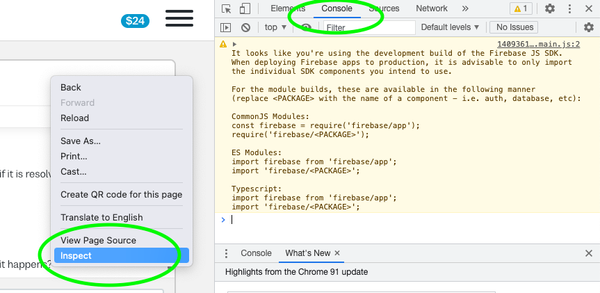
5) In addition, please always include the link to the lesson/lesson ID, so that we can see exactly what went wrong.
6) Then send all that information to Verbling Support so that they can investigate and take the necessary steps:
https://support.verbling.com/hc/en-us/requests/new


